Hat
CircuitPython driver for RaspberryPi Build HAT
Author(s): Dario Cammi
Implementation Notes
Hardware:
Software and Dependencies:
Adafruit CircuitPython firmware for the supported boards: https://circuitpython.org/downloads
Adafruit’s Bus Device library: https://github.com/adafruit/Adafruit_CircuitPython_BusDevice
AsyncIO library: https://github.com/adafruit/Adafruit_CircuitPython_asyncio
- class buildhat.hat.Hat(tx: microcontroller.Pin, rx: microcontroller.Pin, reset: microcontroller.Pin, receiver_buffer_size: int = 2048, debug: bool = False)
CircuitPython driver for RaspberryPI Build HAT
- Parameters:
tx (microcontroller.Pin) – Transmit pin used for serial communication with the HAT
rx (microcontroller.Pin) – Receive pin used for serial communication with the HAT
reset (microcontroller.Pin) – Reset output pin connected to the hat
intreceiver_buffer_size (int) – Serial bus receive buffer
debug (bool) – When
Trueprint to the output console the all the hat initialization steps plus other information about the communication with the hat
This library let you control Lego® devices (motors, distance sensors, color sensors, etc…) through the RaspberryPI Build HAT.
Important
The first time that the Build HAT library starts need to load the firmware in the HAT. It takes about 30 seconds to load the firmware and restart the HAT. Please wait until the firmware is loaded without interrupting the execution
Connect a CircuitPython device to the RaspberryPI Build HAT require just 4 for wire:
CircuitPython board
Build HAT
Serial TX
GPIO 14
Serial RX
GPIO 15
Digital output (reset)
GPIO 4
GND
GND
Tip
It is also possible to use the 5V from the Build HAT to power the CircuitPython board.
- deinit()
Stop all devices and release the serial bus device
- get_device(port: int) Device
Return the device connected to a specific port
- Parameters:
port – Build HAT port. Range 0 to 3
Once a Lego® device is connected to a Build HAT port it send a “connected” message. When the library receive this message, parse its information and create an instace of the device (motor, color sensor, distance sensor, etc…). The instance of the discovered device can be obtained through this method. See Examples
- property led_mode: str
BuildHat leds mode
By default the color depends on the input voltage with green being nominal at around 8V (The fastest time the LEDs can be perceptually toggled is around 0.025 seconds)
Mode values
Orange led
Green led
orangeon
off
greenoff
on
bothon
on
offoff
off
voltageon when undervoltage or overvoltage
on when voltage is ok (aroung 8V)
- readline(skip: str = None) str | None
Read on line from the serial port of Build HAT
- Parameters:
skip – Line string to skip
- Returns:
Line that has been read
- property serial: busio.UART
Serial bus connected to the hat
- stop_all_devices()
Stop all devices connected to the hat
- update() None
Process all the incoming messages from the hat
Important
In order to process all the hat messages this function must be called in a loop. Don’t use functions like
time.sleepthat block the code execution and prevent update to process the messagesOnce the instance of
Hatis created theupdate()method should be called in an async loop:import board import asyncio from buildhat.hat import Hat buildhat = Hat(tx=board.TX, rx=board.RX, reset=board.GP23) # Update loop to process hat messages async def buildhat_loop(hat): while True: hat.update() await asyncio.sleep(0) # Your program loop async def program_loop(hat): while True: # Put you program code loop here. For example here you can # start a motor, read a color etc... await asyncio.sleep(0) async def main(): buildhat_loop_task = asyncio.create_task(buildhat_loop(buildhat)) program_loop_task = asyncio.create_task(program_loop(buildhat)) await asyncio.gather(buildhat_loop_task, program_loop_task) asyncio.run(main())
- async vin() float
Get the voltage present on the input power jack in Volt
- Returns:
Voltage on the input power jack
Example code:
import board
import asyncio
from buildhat.hat import Hat

buildhat = Hat(tx=board.TX, rx=board.RX, reset=board.GP23, debug=True)

async def buildhat_loop(hat):
    while True:
        hat.update()
        await asyncio.sleep(0)

async def voltage_loop(hat):
    while True:
        voltage = await hat.vin()
        print(f"Voltage: {voltage}V")
        await asyncio.sleep(1)

async def main():
    buildhat_loop_task = asyncio.create_task(buildhat_loop(buildhat))
    voltage_loop_task = asyncio.create_task(voltage_loop(buildhat))

    await asyncio.gather(buildhat_loop_task, voltage_loop_task)

asyncio.run(main())
Devices
- class buildhat.device.Device
A generic Lego® device (motor, color sensor, distance sensor, etc..)
It can be either a passive device on an active device
- property hat: buildhat.hat.Hat
Return a Build HAT instace
- property is_connected: bool
Return
Truewhen the device is connected at th build hat orFalsewhen it disconnected
- property type: int
Return the device type it
See
DeviceType
- class buildhat.activedevice.ActiveDevice
A generic Lego® active device (motor, color sensor, distance sensor, etc..)
Active devices can send and receive data: speed values, pid parameters, etc… The list of the data items readeable and writables are the device modes.
- property hat: buildhat.hat.Hat
Return a Build HAT instace
- property data_update_interval: int
Data update interval in ms when a combi or single read mode is selected
- property is_connected: bool
Return
Truewhen the device is connected at th build hat orFalsewhen it disconnected
- select_read_mode(mode: CombiModes | int) None
Select a continuos read for combimode or single mode
- Parameters:
mode – A CombiMode or a single mode number
- Returns:
True if mode has been changed or False if mode was already selected
When mode in an
inta single read mode is selected. When mode is an instance ofCombiModesa multiple (combi) read mode is selected
- property type: int
Return the device type it
See
DeviceType
- class buildhat.devices.colordistancesensor.ColorDistanceSensor
Boost color & distance sensor
Lego® part number: 88007
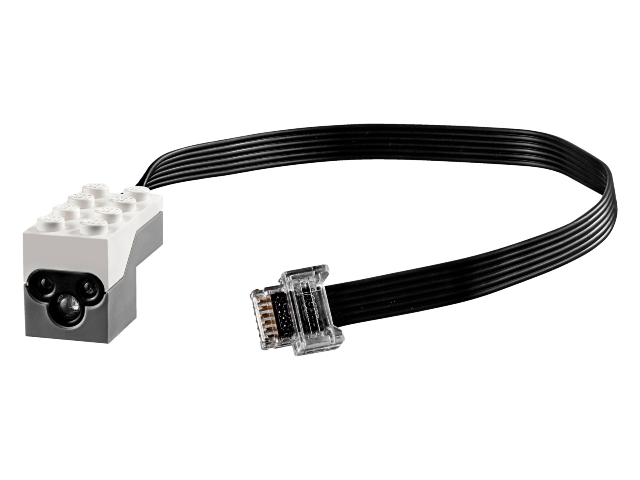
Image from Bricklink
- property hat: buildhat.hat.Hat
Return a Build HAT instace
- property data_update_interval: int
Data update interval in ms when a combi or single read mode is selected
- async get_ambient_light() int
Read the intensity of the ambient light. Range 0 to 100
It takes
num_read_averagereads to compute the average color value
- async get_color() Color
Read the color and return the nearest Lego® color
It takes
num_read_averagereads to compute the average color value
- async get_color_rgb() Tuple[int, int, int]
Read the color in RGB format
It takes
num_read_averagereads to compute the average color value
- async get_reflected_light() int
Read the intensity of reflected light. Range 0 to 100
It takes
num_read_averagereads to compute the average color value
- property is_connected: bool
Return
Truewhen the device is connected at th build hat orFalsewhen it disconnected
- property num_read_average: int
Number of reads to compute the average result. Range 1 to 25
The value of this property is used to calculate the average in the following methods:
Tip
Setting this property value to 1 disable the average calculation
- select_read_mode(mode: CombiModes | int) None
Select a continuos read for combimode or single mode
- Parameters:
mode – A CombiMode or a single mode number
- Returns:
True if mode has been changed or False if mode was already selected
When mode in an
inta single read mode is selected. When mode is an instance ofCombiModesa multiple (combi) read mode is selected
- set_color(color: Color) None
Set the led color. No measures performed in this mode
- Parameters:
color – Color to display
- property type: int
Return the device type it
See
DeviceType
- class buildhat.devices.colorsensor.ColorSensor
Color sensor
Lego® part number: 45605
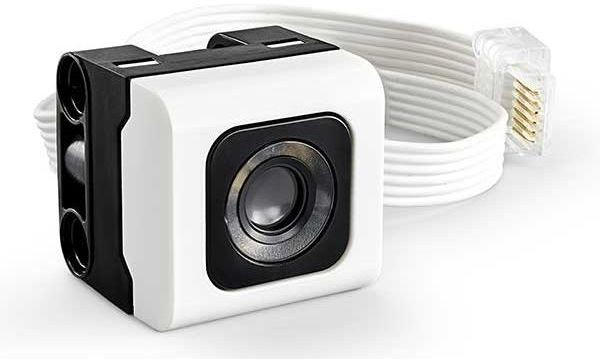
Image from Bricklink
- property hat: buildhat.hat.Hat
Return a Build HAT instace
- property data_update_interval: int
Data update interval in ms when a combi or single read mode is selected
- async get_ambient_light() int
Read the intensity of the ambient light. Range 0 to 100
It takes
num_read_averagereads to compute the average color value
- async get_color() Color
Read the color and return the nearest Lego® color
It takes
num_read_averagereads to compute the average color value
- async get_color_hsv() Tuple[int, int, int]
Read the color in HSV format
It takes
num_read_averagereads to compute the average color value
- async get_color_rgbi() Tuple[int, int, int, int]
Read the color in RGBI format
It takes
num_read_averagereads to compute the average color value
- async get_reflected_light() int
Read the intensity of reflected light. Range 0 to 100
It takes
num_read_averagereads to compute the average color value
- property is_connected: bool
Return
Truewhen the device is connected at th build hat orFalsewhen it disconnected
- property num_read_average: int
Number of reads to compute the color average result. Range 1 to 25
The value of this property is used to calculate the average in the following methods:
Tip
Setting this property value to 1 disable the average calculation
- select_read_mode(mode: CombiModes | int) None
Select a continuos read for combimode or single mode
- Parameters:
mode – A CombiMode or a single mode number
- Returns:
True if mode has been changed or False if mode was already selected
When mode in an
inta single read mode is selected. When mode is an instance ofCombiModesa multiple (combi) read mode is selected
- property type: int
Return the device type it
See
DeviceType
- class buildhat.devices.lightmatrix.LightMatrix
3x3 light matrix
Lego® part number: 45608
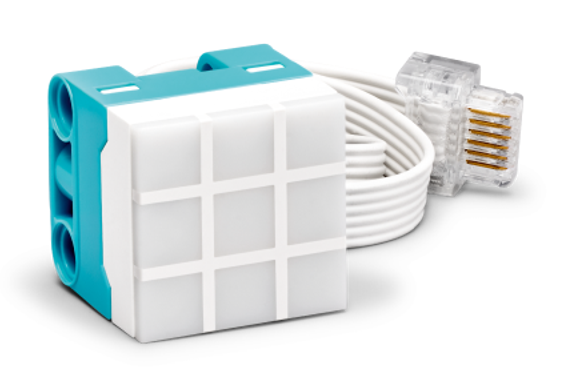
Image from Bricklink
- property hat: buildhat.hat.Hat
Return a Build HAT instace
- property data_update_interval: int
Data update interval in ms when a combi or single read mode is selected
- display_level_bar(level: int) None
Display a level bar from 0 to 9
The level bar is always green
- Parameters:
level – The height of the bar. Range 0 to 9
- display_single_color(color: MatrixColor) None
Display the same color on all 9 pixels
- Parameters:
color – Color to display. Instance of MatrixColor
brightness – Leds brightsness from 0 to 10
- fill_pixels(color: MatrixColor, brightness: int) None
Fill the pixels buffer with one color
- Parameters:
color – Pixel color from
MatrixColorbrightness – Pixel brightness. 0 to 10
Important
Pixel changes are not displayed. Use display_pixels to display the changes
- property is_connected: bool
Return
Truewhen the device is connected at th build hat orFalsewhen it disconnected
- off()
Turn off the device
- on()
Turn on the device
- select_read_mode(mode: CombiModes | int) None
Select a continuos read for combimode or single mode
- Parameters:
mode – A CombiMode or a single mode number
- Returns:
True if mode has been changed or False if mode was already selected
When mode in an
inta single read mode is selected. When mode is an instance ofCombiModesa multiple (combi) read mode is selected
- set_display_image_transition(transition: MatrixTransition) None
Set the transition mode between the images on the display
- Parameters:
transition – Desired transition. Instance of MatrixTransition
Setting a new transition mode will wipe the screen and interrupt any running transition. See
MatrixTransitionfor the available options.
- set_pixel(x: int, y: int, color: MatrixColor, brightness: int) None
Set color and brightness of one pixel in the buffer
- Parameters:
x – X pixel coordinate. 0 to 2
y – Y pixel coordinate. 0 to 2
color – Pixel color from
MatrixColorbrightness – Pixel brightness. 0 to 10
Important
Pixel changes are not displayed. Use display_pixels to display the changes
- property type: int
Return the device type it
See
DeviceType
- class buildhat.devices.ultrasonicdistancesensor.UltrasonicDistanceSensor
Distance sensor
Lego® part number: 6302968
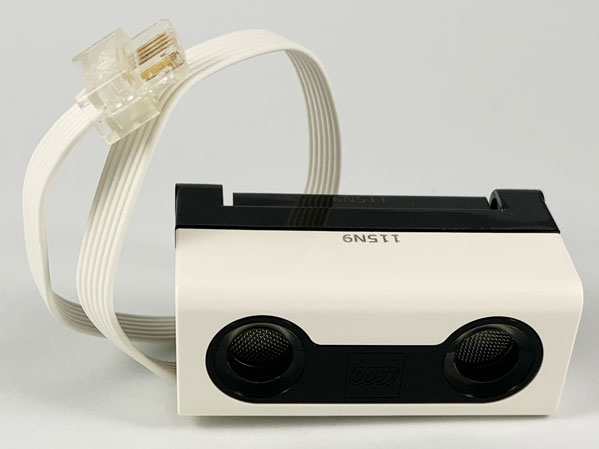
Image from Bricklink
- property hat: buildhat.hat.Hat
Return a Build HAT instace
- property data_update_interval: int
Data update interval in ms when a combi or single read mode is selected
- property distance: int
Return the distance in mm
import board
import asyncio
from buildhat.hat import Hat

sensor_port = 0
buildhat = Hat(tx=board.TX, rx=board.RX, reset=board.GP23)

async def buildhat_loop(hat):
    while True:
        hat.update()
        await asyncio.sleep(0)

async def read_loop(hat):
    sensor = buildhat.get_device(sensor_port)

    while True:
        d = sensor.distance
        if d > 0:
            print(f"Distance {d} mm")
        else:
            print("Please put an obstacle in front of the ultrasonic sensor")
        await asyncio.sleep(0.2)

async def main():
    buildhat_loop_task = asyncio.create_task(buildhat_loop(buildhat))
    read_loop_task = asyncio.create_task(read_loop(buildhat))

    await asyncio.gather(buildhat_loop_task, read_loop_task)

asyncio.run(main())
- eyes(*args: int) None
Brightness of LEDs on sensor
- Parameters:
args – One or four brightness arguments of 0 to 100
- Raises:
DistanceSensorError – Occurs if invalid brightness passed
If len(args) == 1 all led are set to the same brightness value If len(args) == 4 leds are set in this order: upper right, upper left, lower right, lower left
import board
import asyncio
from buildhat.hat import Hat

sensor_port = 0
buildhat = Hat(tx=board.TX, rx=board.RX, reset=board.GP23)

async def buildhat_loop(hat):
    while True:
        hat.update()
        await asyncio.sleep(0)

async def eyes_loop(hat):
    sensor = buildhat.get_device(sensor_port)
    pause = 0.02

    while True:
        # Drive all four eyes together
        for i in range(100):
            sensor.eyes(i)
            await asyncio.sleep(pause)

        # Drive all four eyes one a the time
        for i in range(100):
            sensor.eyes(i, 0, 0, 0)
            await asyncio.sleep(pause)
        for i in range(100):
            sensor.eyes(0, i, 0, 0)
            await asyncio.sleep(pause)
        for i in range(100):
            sensor.eyes(0, 0, i, 0)
            await asyncio.sleep(pause)
        for i in range(100):
            sensor.eyes(0, 0, 0, i)
            await asyncio.sleep(pause)

async def main():
    buildhat_loop_task = asyncio.create_task(buildhat_loop(buildhat))
    eyes_loop_task = asyncio.create_task(eyes_loop(buildhat))

    await asyncio.gather(buildhat_loop_task, eyes_loop_task)

asyncio.run(main())
- property is_connected: bool
Return
Truewhen the device is connected at th build hat orFalsewhen it disconnected
- on()
Turn on the device
- select_read_mode(mode: CombiModes | int) None
Select a continuos read for combimode or single mode
- Parameters:
mode – A CombiMode or a single mode number
- Returns:
True if mode has been changed or False if mode was already selected
When mode in an
inta single read mode is selected. When mode is an instance ofCombiModesa multiple (combi) read mode is selected
- property type: int
Return the device type it
See
DeviceType
Motors
- class buildhat.motors.passivemotor.PassiveMotor
A Lego® passive motor
Passive motor are passive device threrefore can not return data to the hat. Passive motor have no encoder are simple DC motors
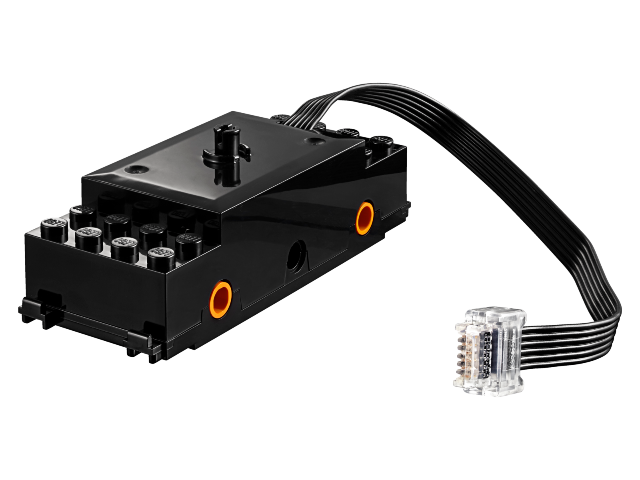
Train motor image from Bricklink
- property hat: buildhat.hat.Hat
Return a Build HAT instace
- property default_speed: float
Set the default speed of the motor. Range -1 to 1
- Raises:
ValueError – Occurs if invalid speed passed
- property is_connected: bool
Return
Truewhen the device is connected at th build hat orFalsewhen it disconnected
- off()
Stop motor
- on()
Start the motor at the maximum speed
- property power_limit: float
Motor power limit. Range 0 to 1
- Raises:
ValueError – Occurs if invalid power limit passed
- pwmparams(pwmthresh, minpwm)
PWM thresholds
- Parameters:
pwmthresh – Value 0 to 1, threshold below, will switch from fast to slow, PWM
minpwm – Value 0 to 1, threshold below which it switches off the drive altogether
- Raises:
ValueError – Occurs if invalid values are passed
- async run_for_seconds(seconds: float, speed: float | None = None, blocking: bool = True) None
Start motor
- Parameters:
seconds – Running time in seconds
speed – Speed ranging from -1 to 1 or default_speed if None
blocking – Whether call should block till finished
- Raises:
ValueError – Occurs if invalid speed passed or motor is not connected anymore
Example code:
import board
import asyncio
from buildhat.hat import Hat

motor_port = 0
buildhat = Hat(tx=board.TX, rx=board.RX, reset=board.GP23, debug=True)

async def buildhat_loop(hat):
    while True:
        hat.update()
        await asyncio.sleep(0)

async def motor_loop(hat):
    motor = buildhat.get_device(motor_port)
    while True:
        print("Motor running")
        await motor.run_for_seconds(2)
        print("Motor running done")

        await asyncio.sleep(1)

async def main():
    buildhat_loop_task = asyncio.create_task(buildhat_loop(buildhat))
    motor_loop_task = asyncio.create_task(motor_loop(buildhat))

    await asyncio.gather(buildhat_loop_task, motor_loop_task)

asyncio.run(main())
- start(speed: float | None = None) None
Start motor
- Parameters:
speed – Speed ranging from -1 to 1 or default_speed if None
- Raises:
ValueError – Occurs if invalid speed passed or motor is not connected anymore
Example code:
import board
import asyncio
from buildhat.hat import Hat

motor_port = 0
buildhat = Hat(tx=board.TX, rx=board.RX, reset=board.GP23, debug=True)

async def buildhat_loop(hat):
    while True:
        hat.update()
        await asyncio.sleep(0)

async def motor_loop(hat):
    motor = buildhat.get_device(motor_port)
    while True:
        print('Start the motor')
        motor.start()
        await asyncio.sleep(2)

        print('Stop the motor')
        motor.stop()
        await asyncio.sleep(1)

async def main():
    buildhat_loop_task = asyncio.create_task(buildhat_loop(buildhat))
    motor_loop_task = asyncio.create_task(motor_loop(buildhat))

    await asyncio.gather(buildhat_loop_task, motor_loop_task)

asyncio.run(main())
- property type: int
Return the device type it
See
DeviceType
- class buildhat.motors.activemotor.ActiveMotor
A Lego® active motor
Active motors are active devices, they can send and receive data (speed, position, pid parameters, etc…). All active motors have an encoder therefore they measure speed and position. Some active motors have also a one turn absolute encoder.
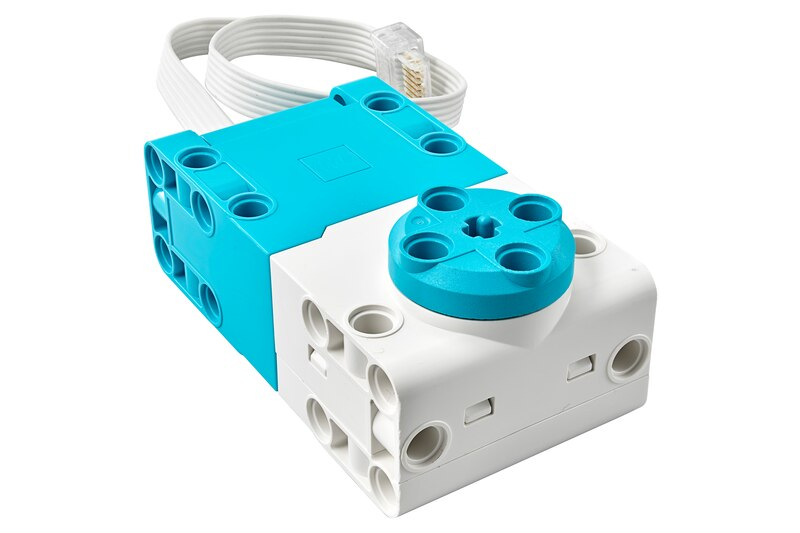
Technic XL motor image from Bricklink
- property hat: buildhat.hat.Hat
Return a Build HAT instace
- property actual_absolute_position: int
Return absolute position of motor in degrees from -180 to 180
Not all motor have an absolute encoder. To test if a motor has an absolute encoder test the value of
has_absolute_position- Raises:
Exception – This motor do not provide absolute position
- coast()
Coast motor
- property data_update_interval: int
Data update interval in ms when a combi or single read mode is selected
- float()
Float motor
- property has_absolute_position: bool
Return
Truewhen the motor has an absolute encoder and therefore can provide abosuole position
- property is_connected: bool
Return
Truewhen the device is connected at th build hat orFalsewhen it disconnected
- off()
Turn off the device
- property position_pid: Tuple[float, float, float]
Return position PID proportional, integral and derivative factors
- pwm(speed: int | float) None
Start the motor (open loop)
- Parameters:
speed – PWM value. Range -1 to 1
- pwmparams(pwmthresh, minpwm)
PWM thresholds
- Parameters:
pwmthresh – Value 0 to 1, threshold below, will switch from fast to slow, PWM
minpwm – Value 0 to 1, threshold below which it switches off the drive altogether
- Raises:
ValueError – Occurs if invalid values are passed
- property release_after_run: bool
Determine if motor is released after running, so can be turned by hand
- property reverse_direction: bool
Reverse motor rotation direction and position counting direction
When
reverse_directionis True a positive speed make the motor running counter clockwise and the position value increment when the motor spin counterclockwise
- property run_command_default_speed: float
Default speed used when no speed is provided on a run command
- async run_for_degrees(degrees: int | float, speed: float | None = None, blocking: bool = True)
Run motor for N degrees (position PID close loop)
- Parameters:
degrees – Number of degrees to rotate
speed – Speed in run_command_speed_unit
blocking – Whether call should block till finished
- Raises:
ValueError – Occurs if invalid speed passed
- async run_for_rotations(rotations: int | float, speed: float | None = None, blocking: bool = True)
Run motor for N rotations (position PID close loop)
- Parameters:
rotations – Number of rotations
speed – Speed in run_command_speed_unit
blocking – Whether call should block till finished
- Raises:
ValueError – Occurs if invalid speed passed
- async run_for_seconds(seconds: float, speed: float | None = None, blocking: bool = True)
Run motor for N seconds (speed PID close loop)
- Parameters:
seconds – Running time in seconds
speed – Speed in run_command_speed_unit
blocking – Whether call should block till finished
- async run_to_absolute_angle(angle: int, speed: float | None = None, blocking: bool = True, direction: Direction = Direction.SHORTEST)
Run motor to an absolute angle (position PID close loop)
- Parameters:
angle – Position in degrees from -180 to 180
speed – Speed ranging from 0 to 100
blocking – Whether call should block till finished
direction – shortest (default)/clockwise/anticlockwise
- Raises:
ValueError – Occurs if invalid angle passed
- async run_to_position(target_position: int | float, speed: float | None = None, blocking: bool = True)
Run motor until reach the target position (position PID close loop)
- Parameters:
target_position – Position to reach in degrees
speed – Speed in run_command_speed_unit
blocking – Whether call should block till finished
- Raises:
ValueError – Occurs if invalid speed passed
- select_read_mode(mode: CombiModes | int) None
Select a continuos read for combimode or single mode
- Parameters:
mode – A CombiMode or a single mode number
- Returns:
True if mode has been changed or False if mode was already selected
When mode in an
inta single read mode is selected. When mode is an instance ofCombiModesa multiple (combi) read mode is selected
- property speed_pid: Tuple[float, float, float]
Return speed PID proportional, integral and derivative factors
- start(speed: float | None = None)
Start motor (speed PID close loop)
- Parameters:
speed – Speed in run_command_speed_unit
- stop()
Stop motor
- property type: int
Return the device type it
See
DeviceType
Enums
- class buildhat.models.devicetype.DeviceType
Enum like class that list all device types
- NONE = 0
None
- SYSTEM_MEDIUM_MOTOR = 1
System medium motor
- SYSTEM_TRAIN_MOTOR = 2
System train motor
- SYSTEM_TURNABLE_MOTOR = 3
System turntable motor
- GENERAL_PWM = 4
General PWM/third party
- BUTTON_OR_TOUCH_SENSOR = 5
Button/touch sensor
- SIMPLE_LIGHTS = 8
Simple lights
- FUTURE_LIGHTS_1 = 9
Future lights 1
- FUTURE_LIGHTS_2 = 10
Future lights 2
- SYSTEM_FUTURE_ACTUATOR = 11
System future actuator (train points)
- WEDO_TILT_SENSOR = 34
WeDo tilt sensor
- WEDO_MOTION_SENSOR = 35
WeDo motion sensor
- COLOR_AND_DISTANCE_SENSOR = 37
Colour and distance sensor
- MEDIUM_LINEAR_MOTOR = 38
Medium linear motor
- TECHNIC_LARGE_MOTOR = 46
Technic large motor
- TECHNIC_XL_MOTOR = 47
Technic XL motor
- SPIKE_MEDIUM_ANGULAR_MOTOR = 48
SPIKE Prime medium motor
- SPIKE_LARGE_ANGULAR_MOTOR = 49
SPIKE Prime large motor
- SPIKE_COLOR_SENSOR = 61
SPIKE Prime colour sensor
- SPIKE_ULTRASONIC_DISTANCE_SENSOR = 62
SPIKE Prime ultrasonic distance sensor
- SPIKE_FORCE_SENSOR = 63
SPIKE Prime force sensor
- SPIKE_3X3_COLOR_LIGHT_MATRIX = 64
SPIKE Essential 3x3 colour light matrix
- SPIKE_SMALL_ANGULAR_MOTOR = 65
SPIKE Essential small angular motor
- TECHNIC_MEDIUM_ANGULAR_MOTOR = 75
Technic medium motor
- TECHNIC_LARGE_ANGULAR_MOTOR = 76
Technic large motor
- class buildhat.motors.speedunit.SpeedUnit
Motor speed unit enum
- RPM = <buildhat.motors.speedunit.SpeedUnit object>
Revolution per minute
- DGS = <buildhat.motors.speedunit.SpeedUnit object>
Degree per seconds
- class buildhat.devices.color.Color
Lego® colors enum like class
- BLACK = <buildhat.devices.color.Color object>
Black color
- VIOLET = <buildhat.devices.color.Color object>
Violet color
- BLUE = <buildhat.devices.color.Color object>
Blue color
- CYAN = <buildhat.devices.color.Color object>
Cyan color
- GREEN = <buildhat.devices.color.Color object>
Green color
- YELLOW = <buildhat.devices.color.Color object>
Yellow color
- RED = <buildhat.devices.color.Color object>
Red color
- WHITE = <buildhat.devices.color.Color object>
White color
- class buildhat.devices.matrixcolor.MatrixColor
3x3 matrix led color enum like clas
- BLACK = <buildhat.devices.matrixcolor.MatrixColor object>
Black color
- BROWN = <buildhat.devices.matrixcolor.MatrixColor object>
Brown color
- MAGENTA = <buildhat.devices.matrixcolor.MatrixColor object>
Magenta color
- BLUE = <buildhat.devices.matrixcolor.MatrixColor object>
Blue color
- CYAN = <buildhat.devices.matrixcolor.MatrixColor object>
Cyan color
- PALE_GREEN = <buildhat.devices.matrixcolor.MatrixColor object>
Pale green color
- GREEN = <buildhat.devices.matrixcolor.MatrixColor object>
Green color
- YELLOW = <buildhat.devices.matrixcolor.MatrixColor object>
Yellow color
- ORANGE = <buildhat.devices.matrixcolor.MatrixColor object>
Orange color
- RED = <buildhat.devices.matrixcolor.MatrixColor object>
Red color
- WHITE = <buildhat.devices.matrixcolor.MatrixColor object>
White color
- class buildhat.devices.matrixtransition.MatrixTransition
3x3 matrix image transition enum like class
- NONE = <buildhat.devices.matrixtransition.MatrixTransition object>
No transition, immediate pixel drawing
- SWIPE_RTL = <buildhat.devices.matrixtransition.MatrixTransition object>
Right-to-left wipe in/out
If the timing between writing new matrix pixels is less than one second the transition will clip columns of pixels from the right
- FADE_IN_OUT = <buildhat.devices.matrixtransition.MatrixTransition object>
Fade-in/Fade-out
The fade in and fade out take about 2.2 seconds for full fade effect. Waiting less time between setting new pixels will result in a faster fade which will cause the fade to “pop” in brightness